 Say It Backwards
Email us and we'll get back to you, usually within two working days. Please include your iPhone or iPad model and iOS version.
Send email
How to play
- Pick a theme on the home screen, for example Footballers or Christmas.
- Player 1 records a secret word. Tap 🎲 Suggest a word for an idea, and press and hold 👀 Hold to see to read it without player 2 seeing. In Anything, you can type your own word.
- Player 1 taps the big microphone button, says the word, and taps the button again to stop.
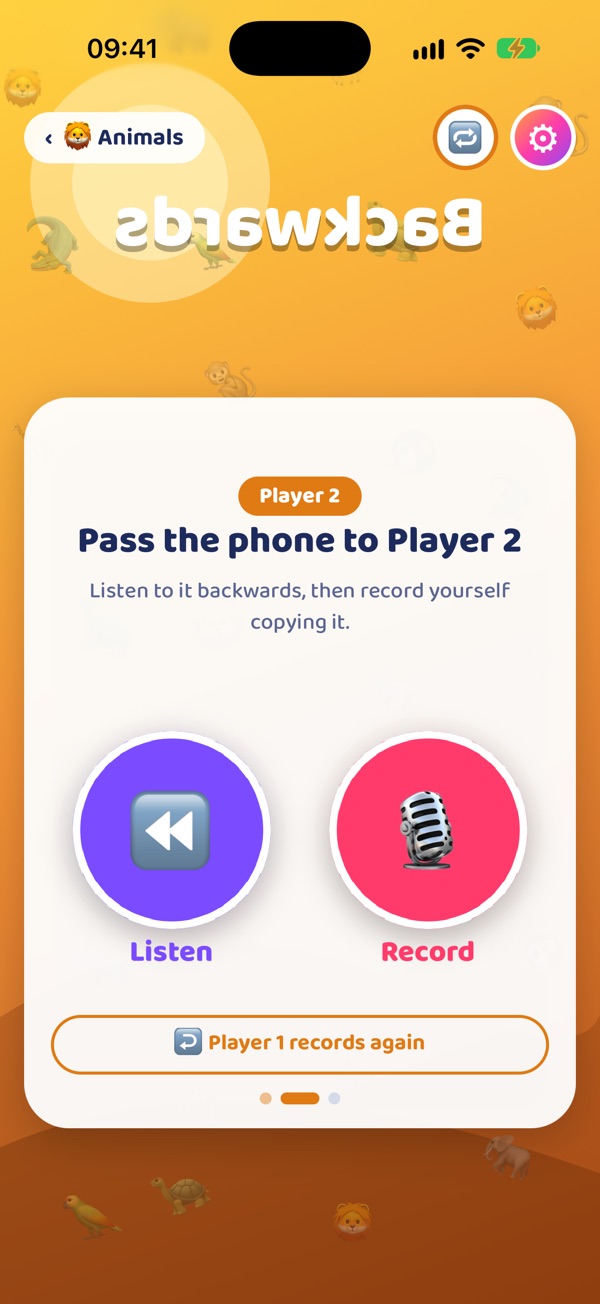
- Hand the device to player 2, who taps Listen to hear the word in reverse. Listen as many times as you like.
- Player 2 taps Record, copies the backwards sound as closely as possible, and taps Stop.
- The app flips the copy back and plays it straight away, so it should sound like the real word. Make a guess! Hear my copy plays it again, and Try again lets player 2 have another go.
- Tap Show the answer to hear player 1's original recording and see the word.
- Tap 🔁 New game to play another round.
Frequently asked questions
The app says it needs the microphone
Say It Backwards needs the microphone to record your voice. If you tapped "Don't Allow", open the Settings app on your iPhone or iPad, scroll down to Backwards and turn on Microphone.
Why is the orange microphone dot on before I tap Record?
To make recording start the moment you tap, the app gets the microphone ready while a Record button is on screen. Nothing is kept from before your tap: that fraction of a second is cut from the recording, and if you leave the screen without recording, it is deleted.
It says my recording is too short
Recordings need to be at least a quarter of a second long. Tap the record button, say the word clearly, and tap the button again once you've finished speaking.
I can't hear anything
Turn up the volume with the volume buttons on your iPhone or iPad. The game plays sound even when the silent switch is on. If you use Bluetooth headphones, check they are connected.
How do I change the language?
Tap the colourful ⚙ button in the top-right corner and choose Türkçe or English. Word suggestions switch to the language you pick.
How do I turn off the button sounds?
Open ⚙ Settings and switch off App sounds. Your recordings still play as normal.
Why are there ads?
Ads keep the game free. There is a small banner at the bottom of the game screen and a full-screen ad after every second finished round, shown when you start the next round.
Are my recordings saved or shared?
No. Recordings stay on your device, are only used for the current round, and are deleted when you start a new game or leave the game screen. See the Privacy Policy.
Does it work on iPad?
Yes. From version 1.1, Say It Backwards has its own larger layout on iPad, in portrait and landscape.
Is there an Android version?
Not yet. Say It Backwards is currently available for iPhone and iPad.